
Google Forms can now build forms with AI. You type "make me a customer feedback survey" and Gemini drafts the questions for you. It's genuinely handy, and it's free if you've got the right Workspace Labs access.
But there's a catch worth knowing before you rely on it. Google's AI only builds one kind of form: text. Typed questions, typed answers, radio buttons, checkboxes. If you want a form where people can record a video, where the questions play as short clips, or where the path changes based on what someone picks, Google's AI can't build that. It was never designed to.
This guide covers what an AI Google Form builder actually does in 2026, where Google's own version stops, and how an AI that builds video-first forms picks up where checkboxes leave off. If you've outgrown plain text surveys, this is the upgrade path.

What "AI Google Form builder" actually means in 2026
The phrase covers two different things, and it's worth separating them.
Google's built-in AI. Google Forms has a "Help me create a form" feature powered by Gemini. You describe what you want, and it drafts the questions. Since its 2025 rollout it's picked up a few more tricks: building a form from a Google Doc or PDF, summarising open-ended text responses, and suggesting extra questions. According to Google's own support docs, this "requires an eligible Google Workspace or Google AI plan" - it isn't on the standard free consumer version, though Google Workspace Labs offers free access in some regions.
Third-party AI form builders. These are separate tools (some are Google Workspace add-ons, some are standalone apps like Clipform) that generate a form from a prompt and then give you things Google Forms doesn't: video questions, recorded answers, branching, custom branding, or all four.
So when someone searches "AI Google form builder," they usually want one of two things: to use AI inside Google Forms, or to find an AI tool that does more than Google Forms can. This guide helps with both.
What Google's AI can and can't build
Google's Gemini feature is good at the boring first draft. It saves you from typing out fifteen questions by hand. Where it stops is anything past plain content.
Here's the honest breakdown, based on what Gemini in Forms does today:
| Google Forms AI (Gemini) | Clipform AI | |
|---|---|---|
| Drafts questions from a prompt | Yes | Yes |
| Builds from a doc or PDF | Yes | Prompt-based |
| Video questions | Text only | Native |
| Video / audio responses | Text only | Built in |
| Conditional branching | Not supported | Yes |
| AI voiceover for questions | No | Yes |
| Edit an existing form with AI | Recreate from scratch | Chat to edit |
| Cost to use the AI | Paid plan or Labs access | Free tier |
A couple of those limits catch people out. Gemini in Forms can't edit a form you've already made - if you want a change, it drafts a whole new one. And it "still won't set up conditional logic between" questions, according to Weavely's 2026 breakdown. So the AI writes your questions, but the moment you want the form to react to an answer, you're back to doing it manually.
None of this makes Google Forms bad. For a quick internal poll or an event RSVP, it's perfect and it's free. The gap only matters when text stops being enough.
When text stops being enough
Text forms all read the same. A one-line answer in a box tells you what someone thinks, but not how they feel, what they meant, or the context behind it. For a lot of forms that's fine. For the ones where the answer is the whole point, it isn't.
Video changes what you get back. When a customer records a 40-second reply instead of typing "it was good," you hear the tone, see the face, and get the detail people never bother to type. That's not a nice-to-have for testimonials, interviews, or research - it's the reason to run the form at all.
The data backs this up. Video is now the format people trust most for decisions.
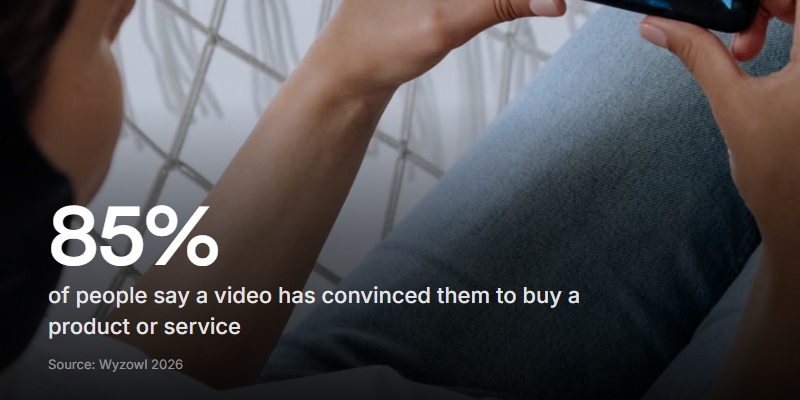
Wyzowl's 2026 report (266 respondents surveyed in late 2025) found 85% of people have been convinced to buy a product or service after watching a video. The same survey found most people would rather watch than read when they're learning about something.
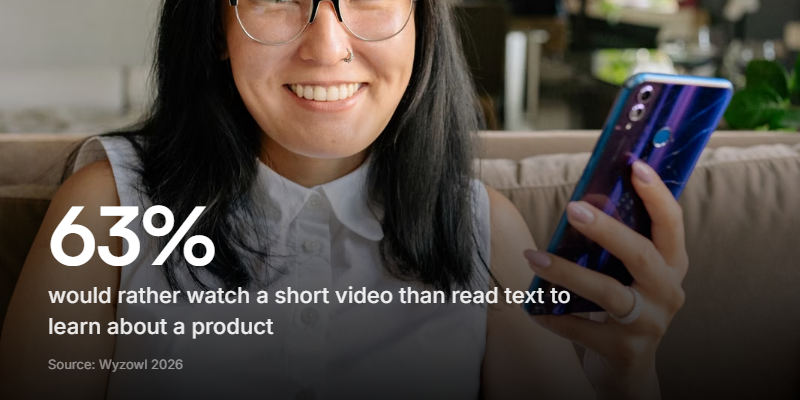
63% said they'd most like to watch a short video to learn about a product, per the same Wyzowl report - compared with 12% who'd read a text article and 5% who'd sit through a sales call. If that's how people prefer to receive information, it's worth asking why your form still makes them type theirs.
How an AI video form builder works
The setup feels the same as Google's AI: you describe the form and it gets built. The difference is what comes out the other side.
With Clipform, you describe the form in plain English - "an async video interview for a marketing role, three questions, one contact step" - and the AI generates the whole thing: the questions, the right node types, and where each one leads. You get a working, video-ready form you can share in minutes, not a text skeleton you then have to rebuild.
From there you can:
- Make any question a video. Record a clip, upload one, or generate a spoken version with AI voiceover so every question has a face or a voice.
- Let people answer on camera. Respondents record video or audio right in the browser on any device. No app, no upload, no account.
- Add branching. Send people down different paths based on what they pick, so the form adapts instead of asking everyone everything.
- Edit by chatting. Change your mind? Tell the AI what to tweak instead of rebuilding from scratch.
Because the questions can be spoken and the answers can be recorded, the form feels like a conversation rather than a spreadsheet with a login. That's the same idea behind a conversational form, just with AI doing the first draft for you.
The responses look different too
This is where the upgrade shows up most. Google Forms pipes everything into a spreadsheet, one text answer per cell. A video-first form gives you something richer to work with.
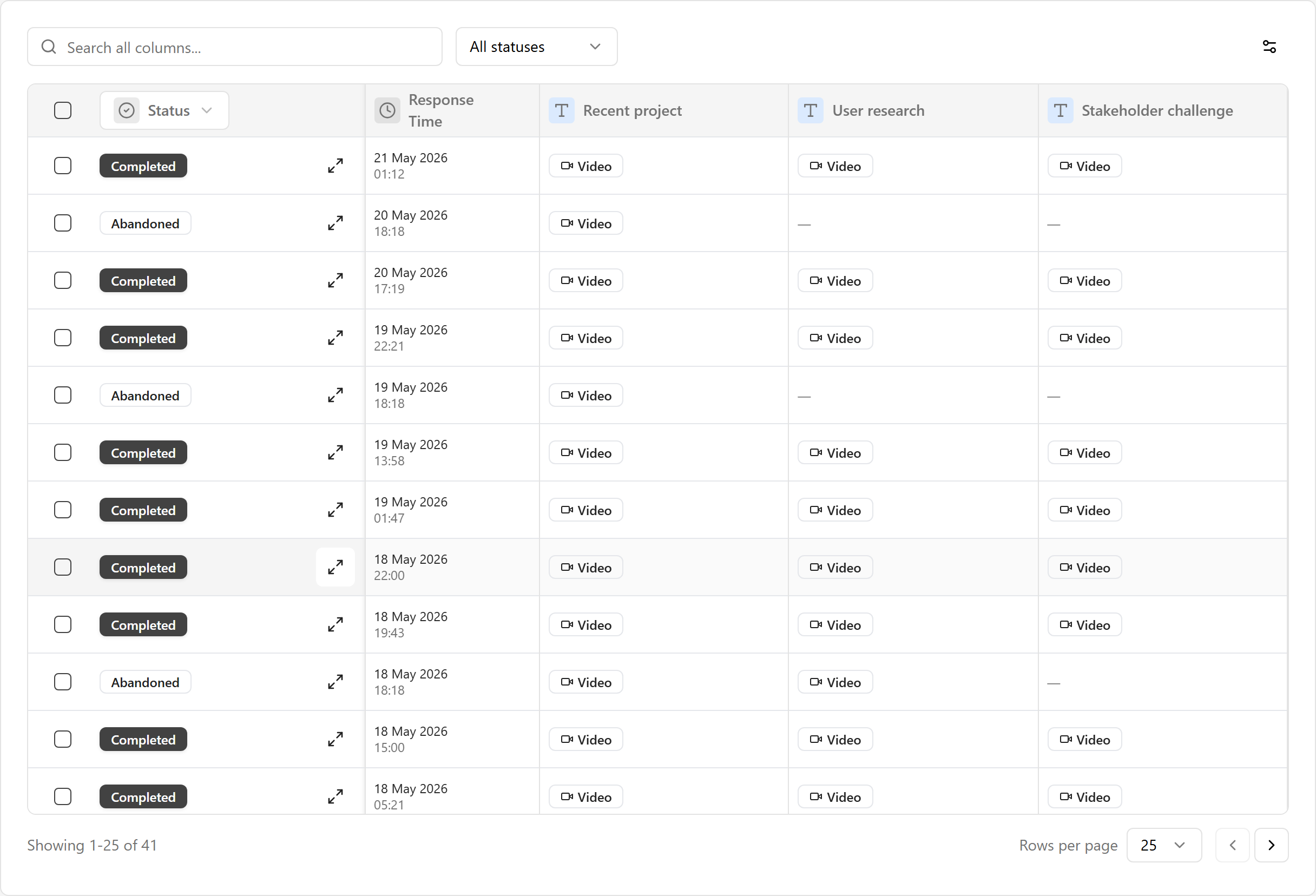
Every recording is transcribed automatically as it comes in. So you get the best of both: the emotion and detail of video, plus searchable text you can scan, filter, and pull quotes from. You watch the ones that matter and read the rest. No follow-up calls to figure out what someone actually meant.
You also get real analytics - views, starts, completions, and where people came from - instead of a response count and a pie chart. For the full side-by-side, see our Google Forms alternative page.
Upgrading from a Google Form you already have
Maybe you've already built the form in Google Forms and you just want more from it. You don't have to throw the work away.
The fastest route is to rebuild it as a Clipform using AI. Describe what your existing form asks for - or paste the questions in - and let the AI draft the video version. Then swap the flat text questions for video prompts where they'll earn their keep (the open-ended ones, usually), turn on recording for the answers you want to see and hear, and add branching if the form needs to react.
You don't need to make every question a video. The trick is picking the two or three where hearing the answer beats reading it - the testimonial, the "why", the open-ended one - and leaving the rest as quick taps. A form that's all video is as tiring as one that's all text.
If you're sharing the form on a poster or table tent, Clipform also generates a QR code in the share dialog, so you skip the third-party generator Google Forms makes you use. The same gap shows up if you need to charge for something: taking a payment on a Google Form means yet another add-on and workaround, where in a video-first builder a payment step is just part of the form.
Google Forms AI vs a video form builder: which to pick
Quick gut check to save you reading the whole thing again:
Stick with Google Forms AI if you need a fast text survey, you're inside the Google ecosystem, and the answers you're collecting are genuinely fine as typed one-liners. It's free, it's quick, and the AI draft saves you real time.
Move to a video form builder if the answer is the point - testimonials, interviews, feedback, applications - or if you need branching, branded design, or questions that play as clips. That's the ceiling Google's AI can't lift, no matter how good the prompt.
Most teams don't need to choose forever. Google Forms handles the quick internal stuff; a video-first builder handles the customer-facing forms where a typed one-liner just won't do. If your reference point is Typeform rather than Google Forms, the same video-first case runs through our roundup of Typeform alternatives.
Does Google Forms have an AI form builder?
Yes. Google Forms has a "Help me create a form" feature powered by Gemini that drafts questions from a text prompt or an existing Doc or PDF. It requires an eligible Google Workspace or Google AI plan (or free Google Workspace Labs access in some regions), and it builds text-based forms only - no video questions, video responses, or conditional branching.
Is the AI in Google Forms free?
Not on the standard free consumer version. Gemini form creation needs a paid Google Workspace or Google AI plan, though Google Workspace Labs offers free access in some regions. Some third-party AI form builders, including Clipform, generate forms from a prompt on a free tier.
Can AI build a form with video questions?
Google's Gemini can't - it only produces text forms. An AI video form builder like Clipform can generate a form from a prompt and make any question a recorded or AI-narrated video, with respondents answering on camera.
Can I edit an existing Google Form with AI?
No. Gemini in Google Forms can't modify a form you've already built - it drafts a new one from a fresh prompt. Some builders let you edit by chatting to the AI instead of starting over.
What's the best AI Google Forms alternative for video?
If you want AI form generation plus video questions and recorded responses, Clipform is built for exactly that. You describe the form, the AI builds it, and respondents can answer on camera. See the full Google Forms comparison for how the two stack up.
Try building one
An AI form builder saves you the boring part either way - you describe the form, it drafts the questions. The real question is what you get to build. Google's AI gives you a solid text form for free. That's the right tool when a typed answer is all you need.
When it isn't - when you want to hear the answer, see the face, or let the form adapt to what people say - that's the moment to upgrade. Clipform builds video-first forms from a prompt on a free tier, so you can see the difference before you commit. Describe the form you'd normally make in Google Forms, and watch what an AI builds when video is on the table.