
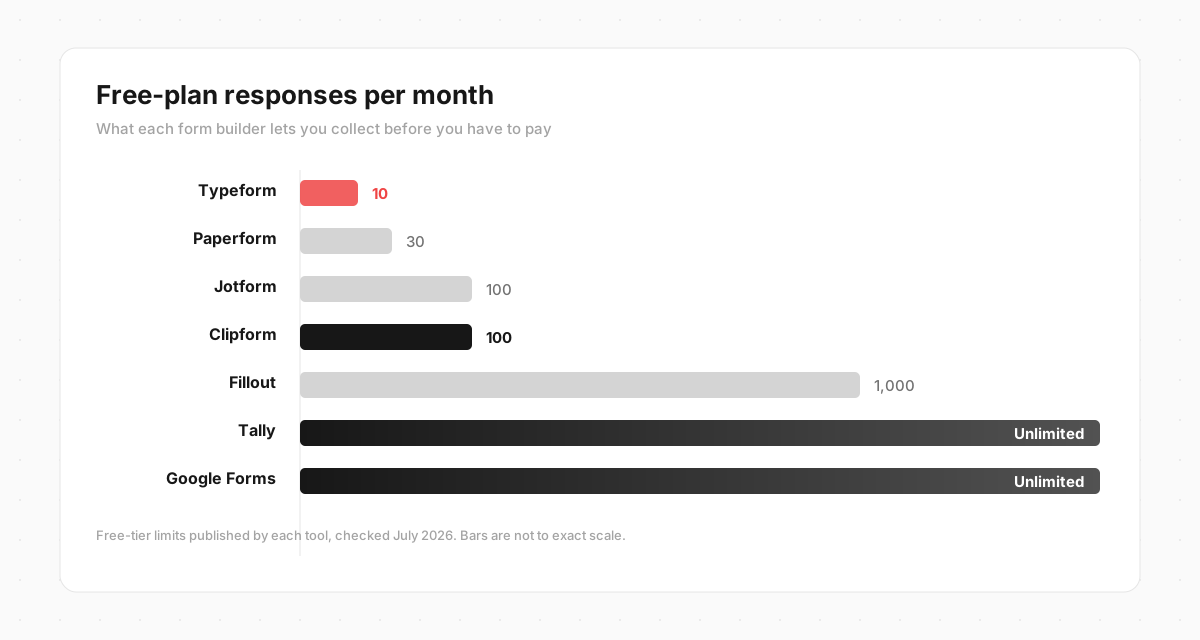
Typeform's free plan gives you 10 responses a month. Not 10 a day, not 10 per form - 10 across your whole account, and then your forms stop collecting until the next month or you upgrade. The cheapest paid plan, Basic, only lifts that ceiling to 100 responses a month, for around $25 (Typeform pricing). For anyone collecting real volume, that ceiling is the reason they start looking.
The good news is that the form builder market in 2026 is crowded with strong options, several of them genuinely free. Below are seven, what each one's free plan actually gives you, what it costs to grow, and who each is best for. One of them is ours (Clipform), and I'll be straight about when it's the right pick and when one of the others wins.

Quick comparison
| Tool | Free plan | Paid from | Best for |
|---|---|---|---|
| Clipform | 100 responses/mo, 5 forms | $24/mo | Video and voice responses |
| Tally | No cap on forms or responses | Free ($24/mo optional) | A free, unlimited form replacement |
| Google Forms | No response cap | Free | Quick internal surveys |
| Fillout | 1,000 responses/mo | $15/mo | Logic-heavy forms, Airtable and Notion |
| Jotform | 100 submissions/mo, 5 forms | $39/mo | Templates and complex layouts |
| Paperform | 30 submissions/mo | $24/mo | Design-led, branded forms |
| SurveyMonkey | View 25 responses/survey | ~$30/mo | Traditional research surveys |
| Typeform | 10 responses/mo | ~$25/mo | The polished flow you already know |
Paid prices are each tool's entry paid tier, mostly billed annually, checked July 2026. The free-plan column is what most people are really comparing, so every tool's section below cites its source.
1. Clipform - for video and voice responses
Full disclosure: this is us. So here is the honest version. Clipform keeps the thing people love about Typeform - one question at a time, so a form feels like a conversation - and changes what a "response" is. Instead of a text box, respondents can answer on camera or in audio, right inside the form, on any device. You can ask questions as video too, and AI narration turns any text prompt into a spoken clip without you filming anything.
Every recording is auto-transcribed the moment it lands, so video answers stay as searchable as text. And if you don't want to build from scratch, you describe the form in plain language and the AI generates it. If you need to charge - a deposit, a session, an entry fee - a payment step takes card payments inline through Stripe, settling straight to your own account.
Free plan: 100 responses a month across up to 5 forms, with the full AI toolkit (narration, media, video) included. Pro is $24 a month for 1,000 completed responses (higher-volume bands available) and no Clipform branding.
Best for: feedback, testimonials, applications, research - anything where seeing and hearing the person tells you more than a typed sentence would.
Where it falls short: if you only need a quick, free text survey, this is more tool than you need - skip to Tally or Google Forms. The template library is smaller than Jotform's, and a few question types (rating scales, file uploads) are still on the roadmap rather than live today.
If you're weighing Clipform specifically against Typeform, feature by feature, we wrote a full head-to-head: Clipform vs Typeform.
2. Tally - the genuinely free pick
Tally is the closest thing to a free Typeform clone. It uses a clean, Notion-style editor, and its free tier is the real headline: no cap on forms or responses, plus conditional logic, calculations, file uploads, and Stripe payments, all at no cost (Tally pricing). Paid plans ($24 a month) exist mainly to remove branding, add custom domains, and unlock team features.
Best for: replacing Typeform's text forms without paying a cent, especially for public-facing, branded forms.
Where it falls short: it's text-first. There are no native video responses, and the design, while tidy, is less polished than Typeform's out of the box.
3. Google Forms - the simplest free option
If your form is an internal survey, an RSVP, or a quick poll, Google Forms is hard to beat on price and familiarity. It's free with any Google account, has no response limit, and drops straight into Google Sheets.
Best for: quick internal surveys and anyone already living in Google Workspace.
Where it falls short: it looks generic, the logic and design options are thin, and there's no one-at-a-time conversational flow. It's a utility, not an experience.
4. Fillout - the power option with a generous free tier
Fillout is a modern builder that leans into logic and integrations. Its free plan allows uncapped forms and 1,000 responses a month - one of the most generous free tiers here - and paid plans start at $15 a month for 2,000 (Fillout pricing). It has the cleanest native Airtable and Notion integrations of any tool on this list.
Best for: complex, logic-heavy forms, and teams that store their data in Airtable or Notion.
Where it falls short: all that flexibility means more setup for a simple form, and video is available but not the focus.
5. Jotform - the template library
Jotform's pitch is breadth: more than 10,000 templates and a widget and integration library longer than almost anyone else's. If your form needs a specific layout or a niche field, Jotform probably has a template for it. The free Starter plan covers 5 forms and 100 submissions a month; the first paid tier (Bronze) is $39 a month for 1,000 submissions (Jotform pricing).
Best for: teams that want a ready-made template for every scenario, plus heavy-duty forms with payments or approval workflows.
Where it falls short: the interface can feel dated and cluttered next to Typeform or Tally, and its entry paid tier is the priciest here.
6. Paperform - the design-led choice
Paperform treats a form like a document or a mini landing page, which gives you a lot of control over layout, typography, and branding. It's genuinely lovely to look at. The catch is the free tier: just 30 submissions a month, which makes it feel more like an extended trial. Essentials is $24 a month (Paperform pricing).
Best for: branded, design-forward forms where presentation is the point.
Where it falls short: the free tier is too small for real use, the editor has a steeper learning curve, and there are no native video responses.
7. SurveyMonkey - for formal research
SurveyMonkey is the incumbent for structured research surveys, with mature analysis, benchmarking, and a deep question bank. Its free Basic plan is restrictive, though: you can only view up to 25 responses per survey, even if you collect more (SurveyMonkey pricing). Paid individual plans start around $30 a month.
Best for: formal market or academic research where the analysis tooling earns its keep.
Where it falls short: the free tier is one of the tightest on this list, the paid plans are among the priciest, and the whole thing feels corporate for a simple feedback form.
What changed in 2026
Two things are worth knowing if you're choosing now rather than three years ago.
First, the market has split into clear lanes. There are free utility forms (Google Forms, Microsoft Forms), lightweight builders that undercut Typeform on price (Tally, Fillout), the polished incumbents (Typeform, Paperform), and a newer video and AI-conversation lane. Which lane you need matters more than which specific logo you pick.
Second, and more interesting: the strongest alternatives changed the format, not just the price. A text field flattens every answer into the same tone. A rating of 3 out of 5 doesn't tell you why, and no drag-and-drop builder can ask a follow-up. That's the gap conversational and video forms fill - a 20-second recorded answer carries context, emotion, and detail a typed sentence never will. If the answers you get are too thin rather than too expensive, that's the shift worth watching.
How to choose
- You want free and unlimited for text forms: Tally, or Google Forms for internal surveys.
- You want the most generous free tier with real logic: Fillout.
- You want a template for every scenario: Jotform.
- You want design polish above all: Paperform (or, honestly, staying on Typeform).
- You're running formal research: SurveyMonkey.
- You want to see and hear your respondents, not just read them: Clipform.
Most people looking for a Typeform alternative are solving one of two problems: the response cap, or the flatness of text answers. Almost every tool here fixes the first. Only a couple fix the second.
Try the video-first option free
If your issue with Typeform is the 10-response ceiling, take your pick from the free options above - Tally and Google Forms won't charge you at all.
If your issue is that text answers don't tell you enough, that's exactly why we built Clipform. You keep the one-question-at-a-time flow you're used to, and respondents answer on camera or in their own voice, with every reply transcribed and searchable. The free plan gives you 100 responses a month and the full AI toolkit, no card required. You can describe the form you need and have it built in under a minute.
FAQ
Is there a completely free Typeform alternative? Yes. Tally has no cap on forms or responses in its free tier, and Google Forms is free with a Google account. Clipform's free plan gives you 100 responses a month with video answers and AI narration included, which no free text-form tool offers.
What is the closest free alternative to Typeform? Tally. It's the nearest match in spirit - a clean, modern editor with conditional logic - and its free tier is genuinely unlimited, unlike Typeform's 10-response cap.
Why do people leave Typeform? The most common reason is response-metered pricing: 10 responses a month on the free plan and 100 on the cheapest paid plan. The second reason is wanting richer answers than a text box can capture, which is what video and conversational forms address.
Is Clipform a good Typeform alternative? If you want video, yes. Clipform keeps Typeform's one-question-at-a-time format and adds video and audio responses, AI narration, and auto-transcription. If you only need a simple free text form, Tally or Google Forms will be a faster fit. See the full Clipform vs Typeform comparison for the detail.