
A video business card is a business card that plays a short video of you instead of just listing your details. There are two kinds, and people mean different things by the term.
The first is a physical card with a small screen built in. Open it and a video plays, like a tiny TV the size of a wallet. They look impressive, and they cost accordingly: usually tens of dollars per card, often with a minimum order.
The second is digital. Your normal card gets a QR code, and scanning it opens a short video of you on the other person's phone. No screen, no batteries, and usually free to set up. This is the kind most people can actually make today, so it's where this guide spends most of its time.
Both do the same job. They put your face and voice in front of someone, so you're the person they remember instead of one more paper rectangle in the stack. This guide covers what each type is, how they stack up, and step by step how to make the digital version, including the part where it collects the other person's details back.

What a video business card actually is
Strip away the format and a video business card is one idea: swap a static list of contact details for a few seconds of the real you.
A paper card tells someone your name and title. A video card shows them how you talk, what you're like, and why the meeting mattered. That's a much stronger memory to leave behind, especially after an event where they've collected forty other cards that all look the same.
The two formats get there in completely different ways.
- Physical video cards build a screen, speaker, and rechargeable battery into a thick card. The video is loaded on at the factory. It's a premium object you hand over in person.
- Digital video cards keep your card the way it is and add a QR code. The video lives online, and the code is just a doorway to it. Nothing is built into the card itself.
That difference drives everything else: cost, whether you can change the video later, and whether the exchange can go both ways. So before you make one, it's worth knowing which you actually want.
Physical vs digital: which one is right for you
Here's the honest comparison. Neither is strictly better. They suit different budgets and different moments.
| Physical card with a screen | Digital card (QR + video) | |
|---|---|---|
| Upfront cost | Tens of dollars each | Free to set up |
| Change the video later | You'd reprint | Swap it anytime |
| Plays on its own | Built-in screen | Needs their phone |
| Collects their details back | One-way | In the same flow |
| Wow factor as an object | A real gadget | It's on their phone |
| Practical to hand out at scale | Costly per card | One card, one code |
The physical card wins on spectacle. Handing someone a card that lights up and talks is a genuine moment, and for a handful of high-value meetings that can be worth every penny.
The digital card wins on everything practical. It costs nothing to try, you can change the video the day you switch jobs, and it's the only one of the two that can collect the other person's details while they watch. For most people, most of the time, digital is the one that makes sense.
Why the digital version fits how people network now
Two things changed that make a digital video card land better than it would have a few years ago.
First, QR codes stopped being weird. Every recent phone scans one straight from the camera, no app required, so pointing a camera at a card and expecting something to happen is now completely normal behaviour. (If you want the nuts and bolts of getting a code onto your card, we cover that in the guide to business cards with a QR code.)
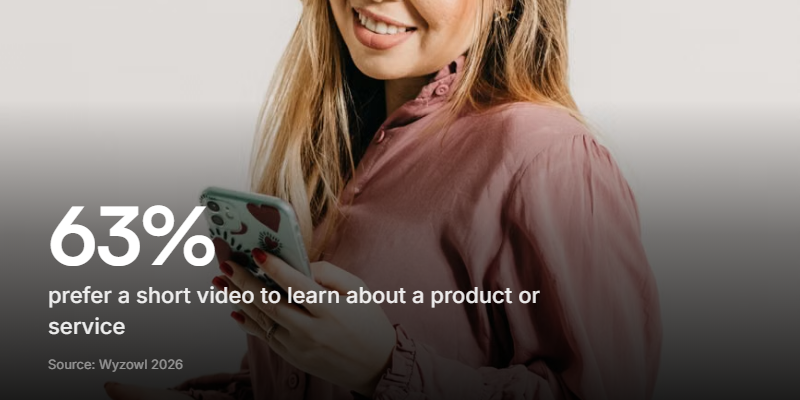
Second, people would rather watch than read. According to Wyzowl's 2026 State of Video Marketing report, 63% of people say they'd most like to watch a short video to learn about a product or service. When you're the product, that's a strong hint about how to introduce yourself.
Add remote and hybrid work to that. A lot of first meetings now happen over a call or a LinkedIn message, where a paper card never reaches. A link to a short video travels anywhere you can paste it: an email signature, a DM, a slide, or a QR code on the card you hand over in person. Educators stretch the same idea into a fuller self-showcase with a teaching portfolio.
How to make a digital video business card
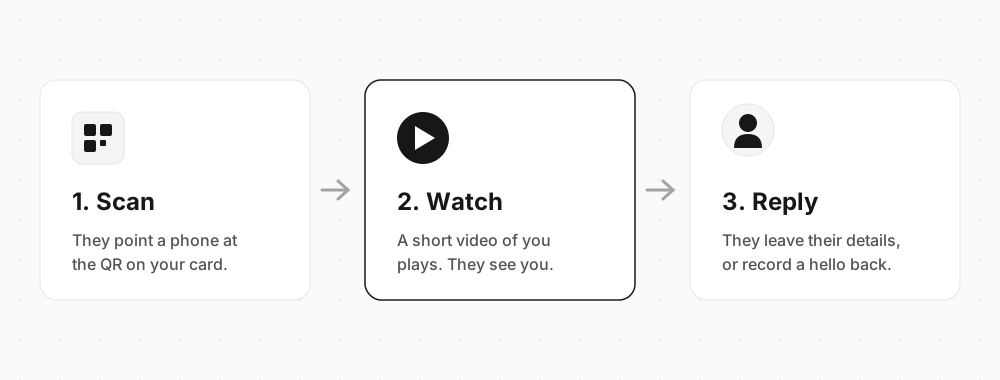
You don't need a design team or any code. You need a 30-second video and a link to point the QR code at. Here's the flow from scan to reply.
1. Record a short intro
Keep it to 20 to 30 seconds. Say who you are, what you do, and one reason it was good to meet. Talk to the camera like you'd talk to a person, not a script.
Don't overthink the production. A phone in a quiet room with a window in front of you beats a fancy setup with bad light. One clear, warm take does more than ten polished ones.

2. Build the flow the QR opens
The QR code needs somewhere to land. A raw video file works, but a plain link is a dead end: they watch, then nothing. A short form is better, because it can do two things in a row.
On a tool like Clipform, you build it without code. The first step plays your video. The next step is a contact form that asks for their name, email, and company. You can even add a step for them to record a quick video hello back, so a one-way card exchange turns into an actual conversation.
3. Generate the QR code
Once the flow is live, the share screen creates a QR code for it. Download it as a PNG and drop it onto your card design, usually the back or a bottom corner. Leave a bit of blank space around the code so cameras can find it, and add a line telling people what they'll get: "Scan to watch a 20-second intro" beats a bare square every time.
4. Test before you print
Scan the finished card with both an iPhone and an Android phone. Check the video loads fast and the contact step works. Do this at the actual printed size, not full-screen on your laptop, because a code shrunk to fit a card corner can still fail if it's too small. Better to catch that now than after a run of 500.
The part that makes it worth it: it collects their details back
This is the bit neither a paper card nor a physical screen card can do, and it's the reason a digital video card earns its place.
A physical video card is a one-way broadcast. They watch your message, and that's the end of it. You have no idea who scanned, and you don't get their details unless they choose to type them in somewhere else later. Most won't.
A digital video card can ask. Because the QR opens a short flow rather than a plain file, the step right after your video can collect their name and email, and the answers land in your dashboard. You get a running count of how many people opened and finished it, broken down by country and device, and any video replies come back auto-transcribed so you can skim them. It's the same idea as a lead capture form, just wrapped around a friendly hello instead of a sales pitch.
Point your video at one clear next step. "Here's what I do, and here's my calendar" beats a generic wave. A card that ends with a specific, easy ask is the one that gets a reply.
When a physical video card is still worth it
Digital isn't always the answer, and it'd be dishonest to pretend otherwise.
If you close a small number of high-value deals, a physical video card is a memorable leave-behind. Real estate, luxury goods, high-end sales, a keynote speaker's swag table: places where the object itself is part of the impression, and where the cost per card is a rounding error next to the deal. Nobody throws away a card that lit up and talked to them.
For that, buy the physical one and enjoy it. But for everyday networking, conferences, cold outreach, and anyone handing out more than a few cards a month, the digital version does the same job for free and tells you who scanned.
FAQ
What is a video business card?
It's a business card that plays a short video of you rather than just listing your contact details. It comes in two forms: a physical card with a small built-in screen, or a digital card where a QR code opens a video on the other person's phone. Both aim to make you more memorable than a plain paper card.
How do I make a video business card?
For the digital kind: record a 20 to 30 second intro, build a short flow that plays the video and then collects the viewer's contact details, generate a QR code for it, and print that code on your card. For the physical kind, you order from a specialist printer and send them your video to load onto the screen.
Are video business cards worth it?
For most people the digital version is worth it, because it's free to set up, you can change the video anytime, and it collects the other person's details while they watch. The physical screen card is worth it in a narrower case: a small number of high-value meetings where a premium object makes an impression.
What's the difference between a physical and a digital video business card?
A physical card has a screen, speaker, and battery built in, so it plays on its own but costs tens of dollars each and can't be updated. A digital card adds a QR code to your normal card that opens the video online, so it's free to set up, editable anytime, and can collect the viewer's details back.
What should I say in my video business card?
Keep it to 20 to 30 seconds. Say who you are, what you do, and one reason the meeting mattered, then point to a clear next step like booking a call. Talk to the camera the way you'd talk to a person. A warm, natural take beats a stiff scripted one every time.
Do people need an app to watch a digital video business card?
No. Modern phones scan a QR code straight from the camera, and the video opens in the browser. There's nothing for the other person to download or sign up for, which is a big part of why the digital version gets watched.
Give yours a test run
A video business card is a simple upgrade to an old idea: instead of handing over a list of details, you hand over a few seconds of yourself. The physical screen card does it with hardware and a premium price. The digital one does it with a QR code, for free, and hands you the other person's details in return.
For a big, high-touch meeting, the physical card is a fun splurge. For everything else, the digital version is easier to make, cheaper to run, and the only one that turns a card exchange into a two-way conversation.
If you want to try it, build a video business card on Clipform: record your intro, add a contact step, and print the QR code straight onto your card. For the QR mechanics themselves, from generators to sizing, the business card QR code guide has the full walkthrough.