
A video resume is a short recording (usually 30 to 90 seconds) where you introduce yourself, walk through a couple of highlights from your experience, and show a bit of who you are. It's an extra that goes with your normal paper resume. Think of it as the 60 seconds you'd get if you bumped into the hiring manager in a lift and they said "so, tell me about yourself."
Here's why it matters more in 2026 than it did five years ago. AI writes the resumes now, and AI screens them. When every application in the pile reads the same, a recording of your actual face and voice is the one thing a chatbot can't generate for you. It's proof you're a real person who can do what your resume claims.
This guide covers what a video resume is, when it's worth making one, how to record it, what to say, real examples by role, and where to host it so it looks professional.
What a video resume actually is
A video resume is you, on camera, making the case for yourself in under two minutes.
It's not a filmed reading of your CV. Nobody wants to watch you list dates and job titles out loud. A good one picks two or three things that matter for this specific role and brings them to life: a project you're proud of, a skill that's hard to prove on paper, the reason you want this job.
People mix up a few terms, so let's clear them up:
- Video resume - a short intro covering who you are and your top highlights. Broad, works for most roles.
- Video cover letter - tied to one specific job, explaining why you want that role. We've got a full guide to video cover letters if that's what you're after.
- Video CV - same thing as a video resume. "CV" is just the term used outside the US.
For the rest of this guide, "video resume" covers all three. The advice is the same.
Why video resumes matter now
The old pitch for video resumes was "stand out and show your creative side." That's still true, but it misses the bigger shift.
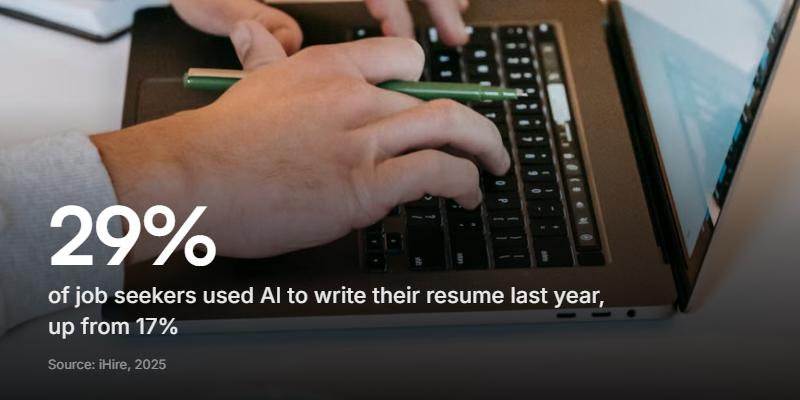
Hiring has a trust problem. Candidates paste the job description into ChatGPT and get a polished resume in ten seconds, so recruiters can no longer tell effort from a good prompt. According to iHire's 2025 State of Online Recruiting report, the share of job seekers using AI to write their resume or cover letter jumped from 17% to 29% in a single year. Everyone sounds equally qualified now, which means the resume tells recruiters less than it used to.
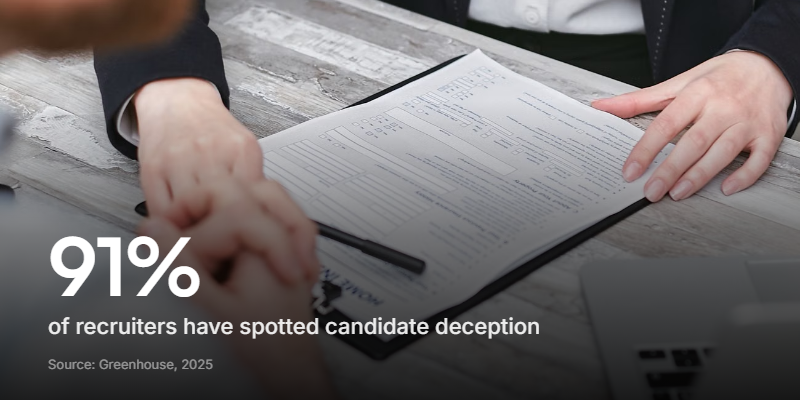
And they know it. Greenhouse's November 2025 hiring report, which surveyed 4,136 job seekers and recruiters, found that 91% of recruiters have spotted candidate deception, and 74% say they're more worried about fake credentials, deepfakes, and misrepresented experience than they were a year ago.
This is exactly why a video resume lands differently right now. When you put your face and voice to your application, the hiring manager gets three things a PDF can't give them:
- Proof you're real. Not a generated persona. An actual person who showed up.
- Genuine effort. Recording a video takes more work than pasting a job description into a chatbot. That effort is the signal.
- How you communicate. Can you explain something clearly? Are you easy to listen to? That's most of what a first interview is checking anyway.
You're not trying to look slick. You're trying to look like someone worth a 20-minute call.
When to make one (and when to skip it)
Video resumes aren't always the right move, and any guide that tells you to make one for every job is wasting your time. Most roles don't ask for one, and plenty of recruiters won't watch an unsolicited video. Effort spent in the wrong place is still wasted effort.
Here's the honest breakdown:
| Make a video resume when | Skip it when |
|---|---|
| The job is client-facing, creative, or sales | The role is deeply technical with no people contact |
| The posting explicitly asks for a video | The posting says "PDF only" or "no attachments" |
| The company posts team videos or has a modern culture | It's a conservative field (traditional law, government, some finance) |
| You're a career-changer and the paper resume undersells you | You're mass-applying and can't personalise each one |
| You want to stand out in a crowded applicant pool | The application is through a rigid system with nowhere to add a link |
When you're unsure, look at the company's careers page and socials. If they show faces and talk like humans, a video will land well. If everything is buttoned-up and formal, trust that signal and stick to paper.
A video resume is a supplement, not a replacement. Unless a posting says otherwise, always send your normal resume too. The video earns you the click; the resume backs it up.
How to make a video resume in five steps
You don't need a studio, a ring light, or editing software. You need a phone, a quiet room, and a plan.
1. Write your talking points
Don't script it word for word. Reading a script on camera is obvious and it kills you, because your eyes go flat and your voice goes robotic. Instead, jot down three to five bullet points:
- Who you are and what you do
- One or two highlights that matter for this kind of role
- Why you're excited about this type of work
- A clear sign-off
Practise talking through them until it feels natural, not memorised.
2. Set up your shot
- Light: Face a window, or put a lamp behind your camera pointing at you. Never have the bright window behind you.
- Background: A tidy wall, a plant, a bookshelf. Nothing distracting, and not your unmade bed.
- Camera height: Eye level. Prop your laptop or phone up on some books so you're not filming up your own nose.
- Sound: This matters more than picture quality. Close the door, kill notifications, and record a 10-second test to check you sound clear.
3. Record it
Look at the lens, not at yourself on the screen. It feels unnatural, but it's what creates eye contact for the viewer.
Hit record and talk through your points. Don't aim for perfect. A small "um" or a natural pause is fine, and honestly it reads as more human. An over-rehearsed, glassy delivery is worse than a slightly rough real one. Do a few takes and keep the one where you sound most like yourself.
4. Keep it short
Sixty seconds is the sweet spot. Ninety is the ceiling. Past two minutes, most people stop watching, and a recruiter screening 40 applications definitely will.
If you can't fit it in 90 seconds, you're trying to say too much. Cut back to the two highlights that matter most.
5. Save it properly
Export as an MP4 (it plays on everything) and give it a real filename. jane-okafor-video-resume.mp4, not final_v3_ACTUAL_final.mp4. Then sort out where it lives, which we'll cover below.
What to say: a simple structure
The thing that makes video resumes hard isn't the recording. It's knowing what to say. This three-part structure works for almost any role and keeps you from rambling.
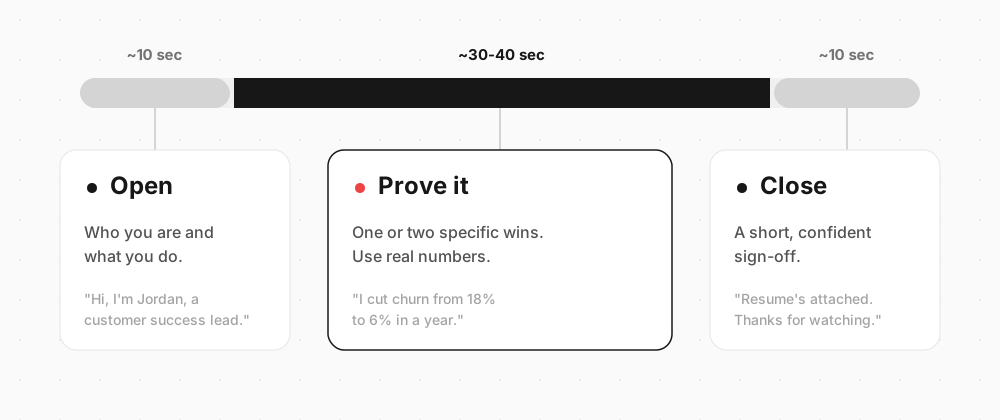
Open (about 10 seconds). Say who you are and what you do. Keep it plain.
"Hi, I'm Jordan. I'm a customer success manager, and I've spent the last four years keeping SaaS customers happy and subscribed."
Prove it (about 30 to 40 seconds). This is the heart of it. Pick one or two things that are hard to show on paper and give a specific, concrete example. Numbers help.
"At my last role I took over an account base that was churning at 18%. By the time I left, we'd got that down to 6%. A lot of that came from actually calling customers before they went quiet, instead of after."
Specifics beat adjectives every time. "I grew retention from 82% to 94%" says more than "I'm passionate about customer success."
Close (about 10 seconds). A clear, low-key sign-off. No grovelling.
"That's me in a nutshell. My resume's attached with the full detail, and I'd love to talk about how I could help your team. Thanks for watching."
That's it. Three parts, under 90 seconds, no teleprompter.
Video resume examples by role
The best format depends on your job. A developer and a fashion marketer should not make the same video. Here's what good looks like across a few types of role.
- Sales, customer success, recruiting. Straight talk-to-camera. These jobs are talking to people, so the video is a live audition. Warmth and clarity matter more than production.
- Design, video, marketing. Show the work. Talk over a few portfolio pieces, or cut in short clips of things you've made. The video itself is a sample of your craft.
- Developers and engineers. Keep it simple and skip the flashy edits. A calm, clear 60 seconds explaining how you think about a problem does more than any effect. Many technical roles won't need a video at all, so save it for the ones where communication is part of the job.
- Career changers. This is where video earns its keep. Use it to connect the dots your resume can't: why you're moving, and what transfers. A recruiter who'd have skipped your resume might give you a shot after 60 seconds of context.
- Teachers and educators. A short intro pairs well with a fuller teaching portfolio: the video shows your classroom presence, the portfolio shows your lessons, plans, and results.
Watch a few real ones before you record. Search "video resume" on YouTube or TikTok and you'll see the full range, from polished to painfully awkward. You'll learn as much from the bad ones as the good ones.
Common mistakes to avoid
- Reading a script off-screen. Your eyes give it away instantly. Bullet points only.
- Going too long. Anything past 90 seconds is pushing it. Brutally cut.
- Bad audio. If they can't hear you clearly, the rest doesn't matter. Test first.
- Being too formal. "Dear hiring committee, I am writing to express..." No. Talk like a person.
- Forcing a joke. A bit of natural personality is great. A scripted gag in the first five seconds makes everyone wince.
- One generic video for every job. If you never mention anything specific, it's obvious you're blasting the same clip everywhere. At least tailor the intro.
Where to host your video resume
This is where a lot of guides fall down. They tell you to upload to YouTube (unlisted) or drop it on Google Drive and paste the link. It works, but it's clunky, and a raw file link looks amateur.
Better options:
- Loom. Records and hosts in one step, gives you a clean link with a thumbnail preview. Great for a quick, no-fuss video resume.
- A personal site. If you have one, embed the video on a dedicated page and link to it from your application.
- A video form tool like Clipform. You get a branded page with your video and a proper URL to drop into an application, instead of a bare file link. It looks more considered, which is half the point of making a video in the first place.
Whatever you pick, the goal is the same: make watching your video feel effortless. The fewer clicks between "here's my video" and the recruiter actually watching, the better.
For employers: collecting video resumes
If you're on the hiring side and you want candidates to send video, don't make them figure out recording, hosting, and file-sharing on their own. Half of them will get it wrong and the other half won't bother.
Give them a link instead. With Clipform's video applications setup, you write the questions, candidates record straight in their browser, and every response lands in one dashboard, auto-transcribed so you can skim instead of watch. No attachments clogging your inbox, no broken links, no "sorry, can you resend that?"
It's a lighter-weight version of the async video interview that tools like VideoAsk made popular, and it turns "send us a video resume" from a big ask into a single tap for the candidate.
FAQ
How long should a video resume be?
30 to 90 seconds. Sixty is the sweet spot. Past two minutes, most recruiters stop watching, especially when they're screening a stack of applications.
Do employers actually watch video resumes?
If the posting asks for one, yes. If you're sending an unsolicited video to a company that didn't request it, some will watch and some won't. Make it short and easy to play so there's no reason to skip it, and always send your normal resume too.
What should I say in a video resume?
Use a three-part structure: a 10-second intro (who you are), 30 to 40 seconds of proof (one or two specific highlights with numbers), and a 10-second sign-off. Skip the full work history - that's what your paper resume is for.
Can a video resume replace a written one?
No. Send both, unless a posting specifically says otherwise. The video complements your resume by adding personality and proof you're real. It doesn't carry the full detail a recruiter needs.
What format should I use?
MP4 is the safest bet - it plays on everything. If you upload to a platform like Loom or Clipform, format is handled for you.
Should I add captions?
Yes, if you can. Plenty of recruiters watch with the sound off during a first pass, so captions keep your message landing. Auto-captions on most platforms are good enough.
Worth the 60 seconds
A video resume won't fix a weak application, and it's not right for every job. But when the role involves talking to people, and when the rest of the pile is AI-generated text that all reads the same, 60 seconds of your real voice is a cheap way to be the candidate they remember.
Pick one role you actually want. Write your three talking points. Record it on your phone, keep the take that sounds most like you, and send it alongside your resume. The bar is lower than you think, because most people won't bother - which is exactly why it works.
If you're hiring rather than job-hunting, flip it around: make video the easy option for your candidates. Our video applications guide walks through the whole setup.