A content creator application is a structured form that brands use to collect information from creators who want to work with them - whether as brand ambassadors, affiliates, UGC producers, or campaign partners. Instead of sifting through DMs and cold emails, a good application form gives you every creator's details in the same format, in one place, ready to evaluate.
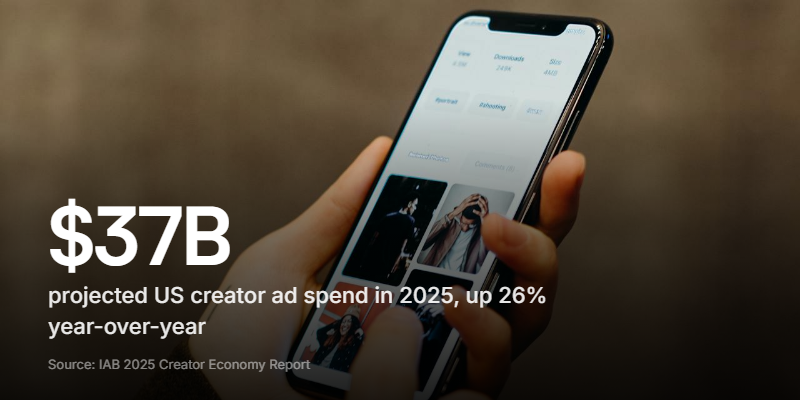
With US creator ad spend projected to hit $37 billion in 2025 and nearly half of ad buyers now calling creators a "must buy," more brands are running creator programs than ever. But most are still collecting applications through Google Forms, email, or a contact page that wasn't designed for the job. The result is messy inboxes, inconsistent submissions, and good creators slipping through the cracks.
This guide covers what belongs in a content creator application form, why video introductions change the quality of applicants you attract, and how to set one up without a developer.
Why you need a dedicated application form
Most brands start their creator program the same way: post about it on social media, tell people to DM or email, and see what comes in. This works when you're getting five applications a week. It breaks at fifty.
Without a structured form, you end up with:
- Inconsistent submissions. One creator sends an Instagram link. Another sends a PDF media kit. A third sends a two-paragraph email about why they love your brand. You can't compare them because they're all in different formats.
- Missing information. You need their follower count, engagement rate, content style, and availability. Without specific fields, half the applicants leave out the details you need to make a decision.
- No way to filter. When everything arrives by email or DM, there's no database, no tags, no sorting. Finding "the creator who applied last month who does fitness content" means scrolling through your inbox.
- Slow response times. When applications pile up in an unstructured format, response times slip. Good creators move fast - if you take two weeks to reply, they've already signed with someone else.
A dedicated form solves all of these. Every applicant answers the same questions, provides the same data points, and lands in the same dashboard. You can review, filter, and respond in a fraction of the time.
What to include in a content creator application
The goal is to collect enough information to evaluate whether a creator is a good fit without making the form so long that nobody finishes it. Here's what matters.
Contact information
Name, email, and phone number. Basic, but essential. Some brands also ask for location and time zone, which matters if you need creators for local campaigns or specific shipping regions.
Social media profiles
This is the core of any creator application. Ask for links to their active platforms - Instagram, TikTok, YouTube, Twitter/X, and any others where they post regularly. Don't just ask for handles; ask for URLs. A link is clickable and less error-prone than "@username" on the wrong platform.
Consider making this section platform-specific. Instead of a single "social media" text field, give separate fields for Instagram, TikTok, and YouTube. This makes it easier to verify accounts and compare applicants by platform.
Follower count and engagement
Ask for approximate follower count on their primary platform. Some brands also ask for average engagement rate (likes + comments per post divided by followers), though many creators don't know theirs off the top of their head.
A simpler approach: ask for their follower count and average likes per post. You can calculate the engagement rate yourself.
Follower count isn't everything. A creator with 5,000 highly engaged followers in your exact niche is often more valuable than one with 200,000 followers and 0.3% engagement. Design your form to surface engagement, not just reach.
Content type and niche
What kind of content do they create? Use a multiple-choice field with options like: product reviews, tutorials/how-tos, lifestyle/day-in-the-life, unboxing, comedy/entertainment, fitness, beauty, food, tech, fashion, travel.
Let applicants select multiple options. Most creators work across a few related categories.
Why they want to work with your brand
A short open-ended question: "Why do you want to be a creator for [Brand]?" or "What makes you a good fit for our creator program?" Keep the character limit reasonable - 200 to 500 characters is enough.
This field is your best filter. Generic answers ("I love your brand!") tell you nothing. Specific answers ("I've been using your protein powder for two years and my audience asks me about it constantly") tell you everything.

Content samples or portfolio
Give applicants a way to share their best work. Options:
- A link field for their portfolio website, Linktree, or a specific post
- A file upload for a media kit PDF
- A video recording field where they can record a short intro directly in the form
The third option is the most powerful and the least common. More on that below.
Availability and terms
If your program has specific requirements (posting frequency, exclusivity, compensation structure), ask about them upfront:
- How many posts per month can you commit to?
- Are you currently working with competing brands?
- What's your rate for a sponsored post? (Or: are you open to product-for-content arrangements?)
- Are you available for in-person events or only remote content?
These questions filter out mismatches before they waste anyone's time.
Why video introductions change everything
Most content creator application forms collect text, links, and maybe a file upload. Almost none ask for video. That's a missed opportunity.
A 60-second video introduction tells you more about a creator's potential than the rest of the application combined. You see how they present themselves on camera, how naturally they speak, how comfortable they are being recorded. These are exactly the qualities that determine whether their sponsored content will feel authentic or forced.
What to ask for:
- "Record a 60-second video introducing yourself and showing us why you'd be a great fit for [Brand]." That's it. One prompt, one recording.
The creators who produce a strong 60-second intro are almost always the ones who produce strong content for your brand. The creators who can't get through a minute of unscripted video are telling you something important about their on-camera presence. It's the same screening logic behind a good podcast guest application, where a short video pitch reveals more than any written bio.
The friction problem: Most form builders don't support in-browser video recording. If you add a "video" field, it's usually a file upload. That means the creator has to record separately, find the file, check the format, compress it if it's too large, and then upload. Most won't bother. The ones who do send inconsistent file sizes, formats, and quality levels.
The solution is a form that lets them record directly - open the camera, speak, submit. No file management, no separate uploads, no compression headaches.
How to evaluate creator applications
Once submissions start coming in, you need a system for evaluating them efficiently. Here's a practical framework.
First pass: disqualify quickly
Filter out applications that are clearly not a fit:
- No active social media presence (dead links, no posts in months)
- Content style completely misaligned with your brand
- Location or availability doesn't match your needs
- Generic "why" answer that could apply to any brand
This should take 10 to 15 seconds per application. The goal is to reduce the pile, not to find winners.
Second pass: evaluate quality
For the remaining applications, look at:
| Factor | What to check | Why it matters |
|---|---|---|
| Content quality | Visit their profiles. Are posts well-shot, well-edited, and visually consistent? | Quality of their organic content predicts quality of branded content |
| Engagement rate | Check likes and comments relative to follower count | High followers with no engagement suggests bought followers or disengaged audience |
| Brand alignment | Does their existing content feel like it belongs alongside your brand? | Forced partnerships look forced. Natural fits perform better |
| Video intro | Do they come across as authentic, enthusiastic, and professional on camera? | On-camera presence is the single best predictor of sponsored content quality |
| Audience match | Do their followers look like your target customers? | A creator's reach only matters if it reaches the right people |
Third pass: shortlist and outreach
Contact your top picks quickly. Good creators get multiple offers, and response time matters. Include what you're offering (compensation, product, commission structure), what you expect (number of posts, timeline, usage rights), and next steps.
Common mistakes with creator applications
- Making the form too long. If your application takes more than five minutes, you'll lose applicants. Especially the busy, in-demand creators you actually want.
- Not asking for video. You're recruiting people who will represent your brand on camera. Not seeing them on camera before deciding is like hiring a writer without reading their work.
- Follower count as the primary filter. A creator with 3,000 followers and a 12% engagement rate will outperform one with 100,000 followers and a 0.5% rate on almost every campaign metric. Filter for engagement and relevance, not vanity metrics.
- Slow follow-up. If someone applies and doesn't hear back for three weeks, they've moved on. Set a response window (even "we'll review within 5 business days") and stick to it.
- No confirmation page. After someone submits, tell them what happens next. "We'll review your application and reach out within one week" is better than a blank screen.
- Using a generic contact form. A "contact us" page with a message box isn't a creator application. It doesn't collect the right information, doesn't create a reviewable pipeline, and signals that your creator program isn't a priority.
Build your creator application form
If you're setting up a content creator application from scratch:
- Choose your form builder. You need something that handles text fields, multiple choice, links, and ideally video recording. If video isn't built in, you'll need a separate step for portfolio review, which slows everything down.
- Keep it short. Contact details, social links, content type, a "why" question, and a video intro. That's five sections, three to five minutes to complete.
- Set up notifications. Make sure you know when applications come in so you can respond quickly.
- Share the link everywhere. Your website, your social bios, your email signature, your community Discord. One link, one form, every creator in the same pipeline.
Clipform handles all of this in one form. Creators record a video introduction directly in the browser - no uploads, no file size limits, no format issues. The rest of the application (contact details, social links, content type) lives in the same flow. Every submission lands in a dashboard with auto-transcribed video, structured data, and filtering. If you're running a creator program and want to see applicants on camera before you make decisions, it's built for exactly this.