
A fundraiser form is a form that collects donations and takes the payment in the same place. Someone reads why you're raising money, picks an amount, enters their card, and they're done. No getting bounced to a separate donation site, no chasing a bank transfer later.
The good news: you don't need to be a registered charity or sign up for a whole nonprofit platform to run one. If you're raising money for a school trip, a medical bill, a community project, or a one-off cause, a simple form that takes a card is often all you need.
This guide covers what a fundraiser form is, what you can (and can't) use one for, how to build one that collects payments without code, and the small design choices that decide whether people finish giving.
What is a fundraiser form?
A fundraiser form collects a supporter's details and their donation in one flow. A plain payment link only takes the money. A fundraiser form can say why you're raising it, show the goal, ask for a name and email, then take the card, all on one screen.
Everything lands as one record: who gave, how much, and how to thank them. That context is the point. You know exactly who to send an update to when you hit the target.
It's different from a full donation platform. Those do donor databases, tax receipts, and recurring memberships. A fundraiser form does the one job most people actually need: collect the money, quickly, without the overhead.
What can you run a fundraiser form for?
Pretty much any cause where you'd otherwise pass round a collection tin or share a bank number. It fits informal and small-group fundraising especially well:
- Community and personal causes - a medical bill, a memorial fund, a family in a tough spot.
- School and club fundraising - a trip, new kit, a building project.
- Sponsored challenges - a run, a walk, a shave, a silence. People sponsor you straight from the form.
- Event fundraisers - take a ticket price and an optional extra donation in one go.
- Emergency and disaster drives - stand something up in minutes when timing matters.
- Creator and project support - a one-off tip jar for people who like what you make.
Keep it to donations, not games of chance. Raffles, prize draws, lotteries, and "donate to win" campaigns count as gambling to payment processors, and Stripe restricts them. Ask people to give to a cause, not to buy a chance at a prize, and your payments stay clean.
How do you make a fundraiser form that collects payments?
With a no-code builder you never touch payment code. The card entry, the security, and the payout are handled for you. In Clipform the flow is four steps:
- Build the form first. Lead with why you're raising money. Keep the questions tight, a name and an email is usually enough.
- Add a Payment node. Set the currency (USD, EUR, GBP, CAD, or AUD) and offer a few suggested amounts so people don't have to think.
- Connect your Stripe account. You go through Stripe's own hosted onboarding once, then you're back in the builder.
- Switch the form to Live and share it. Drop the link in a group chat, put a QR code on a flyer, or embed it on your site.
The money settles in your own Stripe account, not ours. You're the merchant of record, so every donation, payout, and refund lives in your Stripe dashboard.
What makes people actually finish a donation?
Speed and a reason to care. Someone lands with good intentions, and every extra second or field is a chance for those intentions to cool. Here's what moves the needle, and the friction each fix removes:
| Common friction | The fix |
|---|---|
| A wall of fields | Ask only for a name, an email, and the amount |
| "How much is normal?" | Show 3 or 4 suggested amounts, plus a custom option |
| A vague ask | Say exactly what the money does: "$25 buys a week of lunches" |
| A cold grey form | Open with a real face or a short video of who you are |
| Clunky on a phone | Design for mobile first, because that's where people give |
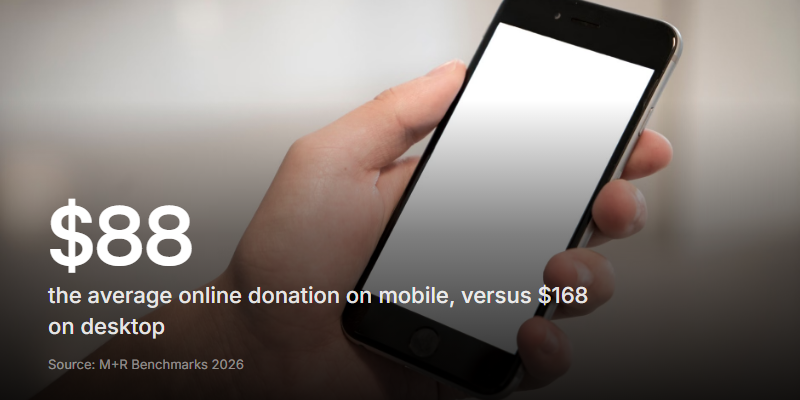
That last one matters more every year. In 2026, 43% of online donations were made on a phone, according to M+R Benchmarks, yet the average mobile gift ($88) trails desktop ($168). A form that's fiddly on a small screen leaves money on the table.
And the human part is doing more work than people think. A bare amount field asks for cash with no reason attached. A form that opens with you, on camera, explaining the cause in 20 seconds gives the donation a reason to exist. People give to people. This is where a video-first form earns its keep: the ask feels like a friend asking, not a checkout.
One-time or recurring: which does your fundraiser need?
Be honest with yourself about this before you pick a tool, because it changes the answer.
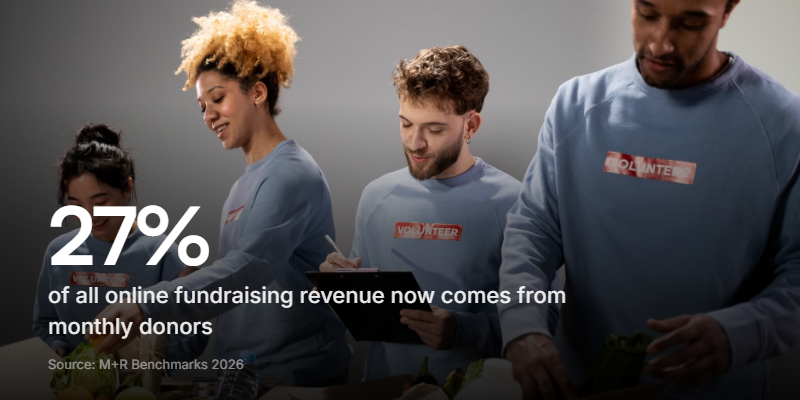
Recurring giving is the growth story in fundraising right now. Monthly donations made up 27% of all online revenue in 2026, per M+R Benchmarks, and monthly donors stick around: 71% are still giving a year later, against 24% of one-time donors. If your cause is ongoing, monthly support is worth building toward.
But recurring means billing someone's card every month, and that's a different setup with its own admin. A fundraiser form is built for one-time gifts: a campaign, an event, an emergency, a single push toward a goal. Clipform handles one-time payments today, which covers most fundraisers people run.
If you genuinely need monthly memberships, a dedicated recurring-giving platform is still the better fit for now. Match the tool to the job.
Where does the money go, and what does it cost?
Straight into your own account, minus two fees worth knowing about:
- Stripe's processing fee - the standard per-transaction cut Stripe takes on any charge. You can see Stripe's current rates on their pricing page.
- The form builder's cut - this varies by tool. With Clipform, paid plans keep 100% of what you collect, and the free plan takes a small commission that's shown in the builder when you add the payment step.
Security sits with Stripe, not you. Card details go straight to Stripe and never touch your form, so you get the money and the record without handling raw card numbers. Refunds work like any Stripe charge, straight from your dashboard. For a deeper look at how taking money inside a form actually works, our guide to payment forms covers the mechanics.
Start your fundraiser
A fundraiser form works when it makes giving quick and human. Say why the money matters, suggest a few amounts, build it for the phone, and take the card without shipping people off to a stranger's checkout. Do that and more of the people who meant to give actually will.
The fastest way to see it is to build one. Add your questions, drop in a payment step, connect Stripe, and share the link. You can start for free and have a fundraiser form collecting donations in a few minutes.