An MCP form builder is a form tool you connect to an AI assistant through MCP, so you describe the form you want in plain English and the assistant builds it for you - no dashboard, no dragging fields around a canvas. You add it once, then ask for a form the way you'd ask a colleague.
The useful part is where it works. MCP is an open standard, so the same builder plugs into whatever you already chat in: Claude, ChatGPT, Cursor, VS Code, and a growing list of others. Set it up once and it travels with you.
One thing separates the options, and it's worth knowing before you pick one. Most MCP form builders hand back the same thing from your prompt: a page of text boxes. A few build something people actually want to fill in. That gap is the whole back half of this guide.
What is an MCP form builder?
An MCP form builder is a form builder that exposes its actions - create a form, add questions, read responses - as tools an AI assistant can call over MCP. You talk to the assistant, the assistant talks to the builder, and a real form lands in your account.
MCP stands for Model Context Protocol. The official docs describe it as "an open-source standard for connecting AI applications to external systems", and compare it to a USB-C port for AI: one standard plug instead of a different cable for every tool. If you want the plain-English version, our guide to what MCP is breaks it down without the jargon.
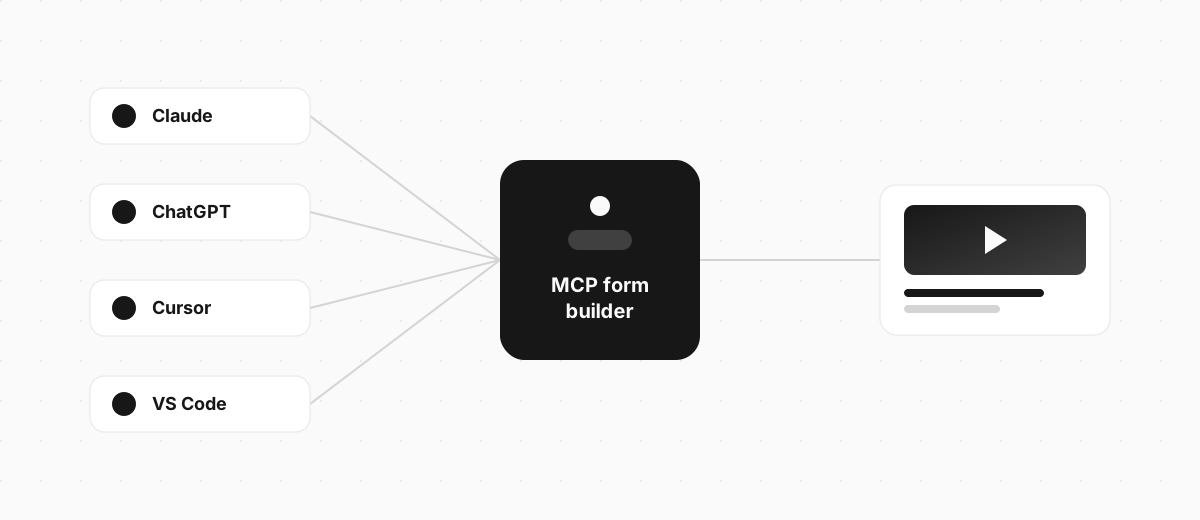
The "connect once, use everywhere" bit isn't marketing. The MCP docs list "AI assistants like Claude and ChatGPT, development tools like Visual Studio Code, Cursor" as clients that all speak the protocol, so a builder that ships one MCP server works across all of them. You're not betting on a single assistant. (Using Claude specifically? The Claude form builder guide walks through that one path; the rest of this guide stays assistant-agnostic.)
MCP form builder vs AI form builder: what's the difference?
An AI form builder has its own AI baked into its dashboard. An MCP form builder is driven by the AI assistant you already use. Same end result - a form from a prompt - but a different place to do the work.
| AI form builder | MCP form builder | |
|---|---|---|
| Where you work | The tool's own website | Your AI chat (Claude, ChatGPT, and so on) |
| What drives it | The tool's built-in AI | The assistant you already pay for |
| Best when | You're happy living in that tool | You're already working in an assistant all day |
Neither is better in the abstract. If you spend your day in a form builder's dashboard, its built-in AI is right there and fine. If you spend your day in Claude or ChatGPT, an MCP connector saves you the tab-switch - you never leave the conversation you're already in. The best tools do both, so you can start a form in chat and keep editing it on the web later. Our guide to building a form with AI covers the built-in route in more depth.
Which MCP form builders can you use?
Several form builders now ship an MCP server, and they all connect the same way: a custom connector you add by URL. The real split isn't the setup. It's what each one builds when you ask.
| Builder | What it builds from your prompt | Where it works |
|---|---|---|
| Jotform | Text forms and surveys | Claude, ChatGPT, and other MCP clients |
| Tally | Text forms with a shareable link | Claude, ChatGPT, and other MCP clients |
| Typeform | One-question-at-a-time text forms | Claude, ChatGPT, and other MCP clients |
| Google Forms (via a skill) | Text-based Google Forms | Claude and other MCP clients |
| Clipform | Video-first forms - questions can play as video or voiceover, and people answer on camera | Claude, ChatGPT, and other MCP clients |
Most of them build the same thing: a wall of text boxes. That's fine when you just need an email address. It's the wrong tool when you want people to actually say something, which is where the next section comes in.
Because they all run on the same open standard, you're not locked in. If you build a form through one MCP builder today and switch assistants next month, the connector comes with you. The only real decision is which builder to point your assistant at.
The part the comparisons skip: what kind of form comes out
Every builder above turns a sentence into a form. Only some let that form be more than a text field. And that difference decides whether anyone finishes it.

In Typeform's Data On Data report, drawn from the 2.6 million forms and 568 million submissions its users created in 2023, forms with images or video saw a 120.6% higher completion rate than forms without. So a video-first form buys you completion without costing you any speed. You keep the one-sentence build, and more people reach the end.
This is why the output matters more than the setup. Clipform is a video-first form builder with an MCP connector, so any question your assistant builds can play as a recorded clip or an AI voiceover, and people can answer with video, audio, or text. Answers come back transcribed automatically, so you skim the text and click into a clip when something's worth watching. Same prompt as any other MCP builder, a very different form at the end.
How to set up an MCP form builder in any assistant
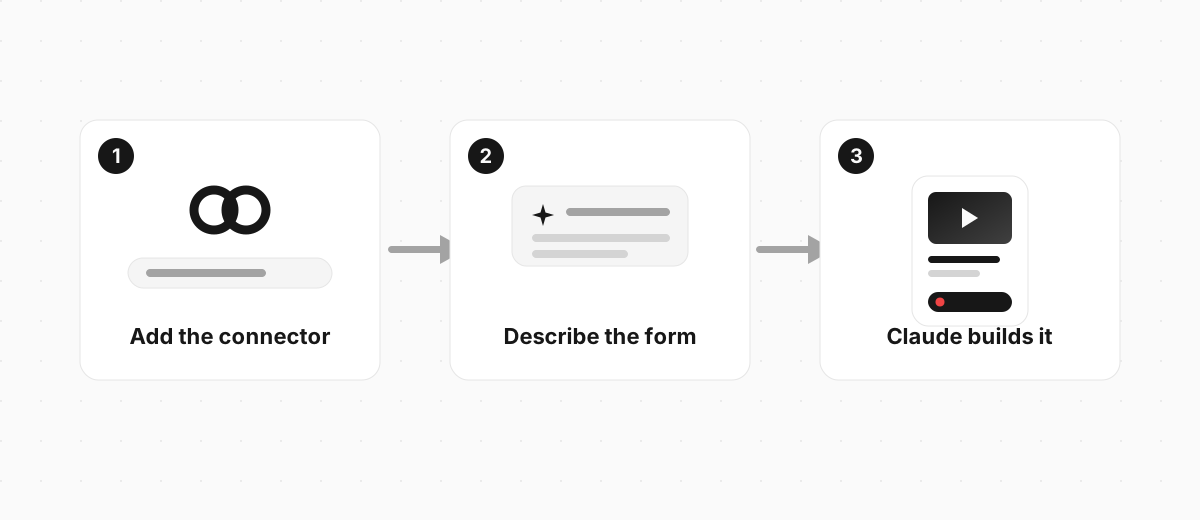
Setup is three steps, and none of them involve a form editor. It's the same flow in Claude, ChatGPT, or Cursor, because they all add a custom connector by URL.
- Add the connector. In your assistant's settings, add a custom connector and paste the builder's MCP URL. For Clipform that's
https://mcp.clipform.io. Sign in once to authorise it. - Describe the form. Tell the assistant what you want in a sentence.
- Refine in the same chat. Ask for changes and each message updates the form in place.
Here's the kind of prompt that works well. The more specific you are, the better the first draft:
Create a customer feedback form with a short video intro, a multiple choice question about what they bought, and an open question asking what we could do better. Finish with a thank-you screen.
Your assistant reads that, calls the connector, and builds the whole thing - questions, field types, order, and copy. You get a link back to try in seconds, then keep going in plain English: "add narration to each question", "use a dark theme", "make question two multiple choice". If it's your first time adding one, our Claude connectors guide walks through the steps with screenshots, and the Clipform setup docs cover it for other assistants too.
Here's the kind of form that comes out. This is a real Clipform, the same shape your assistant builds when you ask:
Try a form built over MCP
A short feedback form with a video question, built on Clipform.
Give it a go - your answers won't be stored.
Copy this templateTry a form built over MCP
A short feedback form with a video question, built on Clipform.
Give it a go - your answers won't be stored.
FAQ
Do I need to code to use an MCP form builder?
No. You add a connector by URL and type what you want in plain English. Building an MCP server takes development skills, but using one that already exists takes a URL and a sign-in.
Does an MCP form builder work in ChatGPT as well as Claude?
Yes. MCP is an open standard that ChatGPT, Cursor, and VS Code support alongside Claude, so a form builder with an MCP server works across all of them. You add it once and it travels between assistants.
Is there a free MCP form builder?
Yes. Clipform's connector adds to your assistant and builds forms on a free tier. You need an account for the assistant and a Clipform sign-in, and nothing else to get your first form.
What's the difference between an MCP form builder and a connector?
A connector is the single app connection you turn on. MCP is the open standard it runs on. "MCP form builder" describes the builder; "connector" describes how it's added to your assistant. Same setup, said two ways.
Point your assistant at a form builder
An MCP form builder turns the assistant you already use into a form tool. Describe what you need, and you have something to share before you'd have finished the first question by hand - in Claude, ChatGPT, or wherever you chat.
The one choice that matters is which builder you point it at, because that decides what lands in your account. If you want the kind of form people actually finish rather than another wall of text boxes, Clipform's connector adds by URL and builds video-first forms from a prompt on a free tier. Point your assistant at it and ask for your first form.