A payment form is a form that also takes the money. Someone answers a couple of questions, enters their card, and pays, all in one place. No getting bounced to a separate checkout, no invoice chased three days later.
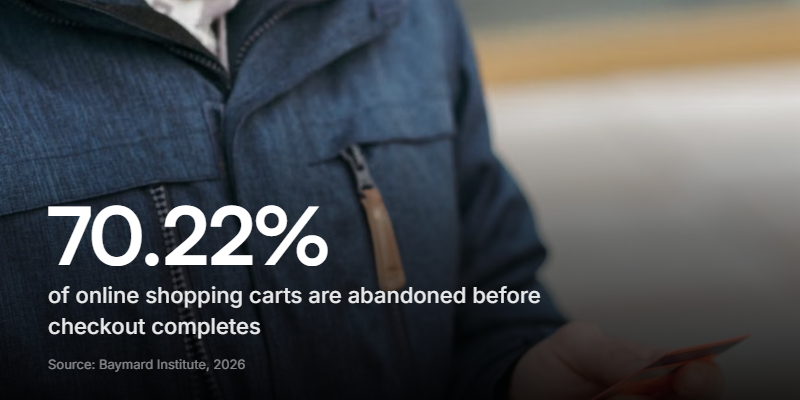
The catch is simple. The moment you ask for payment is the moment most people leave. Around 70% of online carts get abandoned before the payment goes through, according to Baymard Institute's 2026 analysis of 50 separate studies. So the job isn't just bolting a pay button onto a form. It's building something short and human enough that people actually finish.
This guide covers what a payment form is, what you can use one for, how to build one without code, and how to stop losing people at the last step.
What is a payment form?
A payment form collects information and a payment in the same flow. A plain checkout only asks for card details. A payment form can ask a few questions first, what you're booking, which option you want, your email, then take the card at the end. Everything lands as one record: their answers and their payment, together.
That context is the whole point. You know what the person wanted, which option they picked, and how to follow up, all attached to the payment.
Payment forms come in two shapes:
- One-time payments - a booking deposit, a class fee, a ticket, a donation. The person pays once and they're done.
- Recurring payments - a subscription or membership billed every month. Useful, but a different beast, and more than most small businesses need on day one.
Clipform handles one-time payments today. If you need memberships billed monthly, a dedicated subscription tool is still the better fit for now.
What can you use a payment form for?
Pretty much anywhere you'd otherwise send an invoice or a separate payment link. The pattern fits service businesses and creators especially well:
- Booking deposits - take a deposit as someone books, so no-shows cost them, not you.
- Class and session fees - a first session, a workshop seat, a six-week challenge.
- Event registration - collect the ticket price and the attendee's details in one go.
- Services and quotes - charge a fixed fee or a deposit against a bigger job.
- Donations and fundraising - collect one-off card donations without a separate donation platform. See how to run a fundraiser form.
- Paid applications - an application fee that also filters out the people who aren't serious.
Personal trainers already do this. They take a deposit or first-session payment right inside the intake form, so a lead qualifies and pays in the same breath. Massage therapists and bodyworkers run the same play for a booking deposit.
How do you create a payment form?
With a no-code builder, you don't touch payment code at all. The card entry, the security, and the payout are handled for you. That matters because the tools people reach for first often can't take money natively - Google Forms has no built-in payment option, for one, and needs an add-on and a workaround to charge anyone. In Clipform the flow is four steps:
- Build the form first. Add your questions, keep them tight, and put the payment at the end once the person knows what they're paying for.
- Add a Payment node. Set the amount and the currency (USD, EUR, GBP, CAD, or AUD).
- Connect your Stripe account. You go through Stripe's own hosted onboarding once, then you're back in the builder.
- Switch the form to Live and share the link, drop a QR code on a flyer, or embed it on your site.
Respondents enter their card details inline and pay without ever leaving the form. There's no redirect to a third-party checkout and no "you'll be taken to our payment partner" hand-off, which is exactly where a lot of people get cold feet.
The money settles in your own Stripe account, not ours. You're the merchant of record, so the charge, the payout, and any refunds all live in your Stripe dashboard like any other sale.
Why do most payment forms lose the sale?
Because the payment step is where patience runs out. That 70% abandonment figure isn't spread evenly across the visit. People bail hardest at the end, once they've been asked for a card.
Two things drive most of it. The first is surprise costs, a shipping fee or a tax line that shows up only at the last screen. The second is that the form is just too long. Baymard found the average checkout shows 23.48 form elements by default, when an ideal one needs only 12 to 14. Every extra field is one more reason to give up.

This is good news if you're a small business, not a giant retailer. You're not shipping physical goods with a tax table. You control every field on the form. Cutting the clutter is the single easiest win you have.
What makes a payment form convert?
Short, clear, and human. Here's what that looks like in practice, and the friction each fix removes:
| Common friction | The fix |
|---|---|
| Endless fields | Ask only what you need to fulfil the order |
| Vague ask | Say exactly what the person is paying for, and show it |
| Cold, formal checkout | Lead with a real face or a short video, not a grey form |
| Desktop-first design | Build for the phone first, since that's where people abandon most |
| Unclear who's charging | Make it obvious it's you, with a secure card field they recognise |
The context point is worth dwelling on. A bare card field asks for money with no reason attached. A form that opens with you explaining the offer, or even a 20-second video, gives the payment a reason to exist. People pay people, not payment gateways. This is where a video-first form earns its keep: the ask feels like a conversation, not a toll booth.
And keep it on one screen where you can. Every jump to a new page or a new tab is a fresh chance to lose someone.
Is a payment form secure, and what does it cost?
Security is handled by the payment processor, not by you. With Stripe powering the payment, the card details go straight to Stripe and never touch your form or your database. You get the money and the record; you never handle raw card numbers, which keeps the heavy PCI compliance burden off your plate.
On cost, there are two fees worth knowing about:
- Stripe's processing fee - the standard per-transaction cut Stripe takes on any charge, on any plan. You can see Stripe's current rates on their pricing page.
- The form builder's cut - this varies by tool. With Clipform, paid plans keep 100% of what you collect, and the free plan takes a small commission that's shown right in the builder when you add the payment step.
Refunds work the same as any Stripe charge. Because the money settles in your account, you refund and reconcile from your own Stripe dashboard.
Start collecting payments
A payment form only works when it respects the person filling it in. Keep it short, say what they're paying for, make it feel like a human is on the other end, and take the card without shipping them off to a stranger's checkout. Do that and the last step stops being the place your sales go to die.
The quickest way to see it is to build one. Add your questions, drop in a payment step, connect Stripe, and share the link. You can start for free and have a working payment form live in a few minutes.