
Interactive video is any video where the viewer does something besides watch. They click a hotspot, choose which scene plays next, answer a question on screen, or record a reply of their own. The video stops being a broadcast and becomes a two-way exchange.
That's the whole idea. A normal video plays start to finish while you sit back. An interactive video waits for you to act, then responds to what you did.
You've probably used one without noticing. The Netflix episode that let you pick what a character does next. The product video with clickable buy buttons. The training module that pauses to quiz you. The link that asked you to record a quick video answer instead of typing into a form. All interactive video, all different flavours of the same move: the viewer takes part.
This guide breaks interactive video into four types based on what the viewer actually does, shows where each one earns its keep, and helps you choose the right one. There's also an odd gap in this market worth knowing about - most people want interactive video, but hardly anyone is making it. More on that below.
What counts as interactive video
The line is simple: if the viewer can only press play and pause, it's a regular video. If they can do anything that changes what happens next, it's interactive.
That "anything" covers a lot of ground. Clicking a product to buy it. Picking option B and watching a different ending. Typing an answer to an on-screen question. Recording a 30-second reply straight from their webcam. The common thread is that the video reacts to the person watching it.
This matters because "interactive video" gets used as a single label for tools that do wildly different jobs. A shoppable video overlay and a two-way video form both count, but you'd never buy one expecting the other. Sorting them into types is the fastest way to know which one you actually need.
The four types of interactive video
Group interactive video by what the viewer does and four clear types fall out.
| Type | What the viewer does | Good for | Example tools |
|---|---|---|---|
| Click | Taps hotspots, buttons, or products on screen | Shoppable video, CTAs, extra info | Mindstamp, Wistia |
| Choose a path | Picks which scene or ending plays next | Story-driven ads, product tours, demos | Eko, Stornaway |
| Answer | Responds to an in-video quiz or poll | Training, e-learning, knowledge checks | PlayPosit, H5P |
| Record a reply | Films or speaks their own answer back | Feedback, testimonials, screening, research | VideoAsk, Clipform |
1. Click
The viewer taps things on the video itself. A jumper in a fashion clip becomes a buy button. A hotspot reveals a spec sheet. An end card offers three links to click.
This is the most common type in marketing, and the one most people picture when they hear "interactive video." It keeps the viewer inside the video instead of bouncing them to a landing page. Mindstamp and Wistia are typical here - you upload a video and layer clickable elements on top.
2. Choose a path
The viewer decides where the story goes. Watch a scene, hit a fork, pick an option, and a different clip plays. It's the choose-your-own-adventure format, and Netflix's Bandersnatch put it in front of millions.
Branching video works well for product tours ("show me pricing" versus "show me features"), interactive ads, and demos where different audiences care about different things. It's powerful, but it's also the most expensive type to make - every branch is another clip you have to film and edit. Tools like Eko and Stornaway specialise in it.
3. Answer
The video pauses and asks the viewer a question. A training clip stops to check they were paying attention. A lesson drops in a quick poll. Get it wrong and it might replay the section.
This type lives mostly in education and corporate training, where you need proof that someone watched and understood rather than just left the tab open. PlayPosit and the open-source H5P are built around it. For a marketing quiz rather than a training check, an AI quiz maker can draft the questions and turn each one into a video prompt.
4. Record a reply
Here the interaction flips direction. Instead of clicking on the creator's video, the viewer records their own. You ask a question on camera, they answer on camera. Both sides communicate through video, just not at the same time.
This is the type most guides skip, and it's the most useful one for anybody who needs to hear back from people. A recruiter screens candidates with recorded answers. A marketer collects video testimonials without booking a single call. A researcher watches customers explain a problem in their own words. Tools like VideoAsk and Clipform sit in this category.
The first three types are you talking to the viewer. The fourth is the viewer talking back to you. If your goal is to collect something - answers, opinions, stories - only the fourth type does that job.
The interactive video gap
Here's the strange part. Interactive video is one of the most-wanted and least-made formats going.
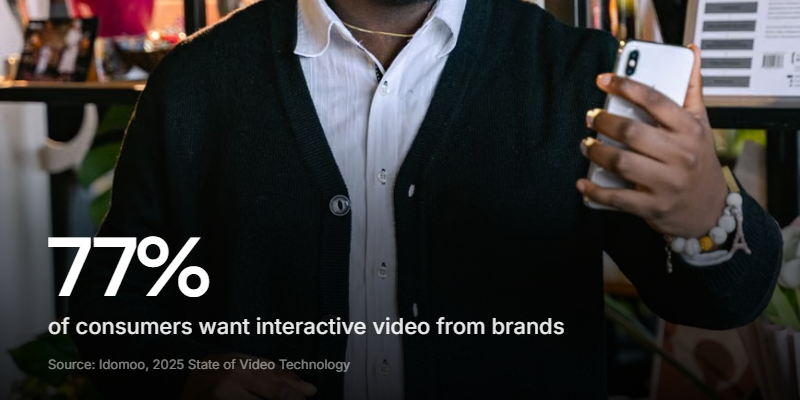
On the demand side, Idomoo's 2025 State of Video Technology Report (surveying 2,510 adults across the US and UK) found that 77% of consumers want interactive videos from brands, rising to 93% among Gen Z. Yet only 30% of them said they'd ever actually received one.
The supply side matches. In Wyzowl's 2026 Video Marketing report, interactive video was one of the least-used formats - just 31% of businesses make it, and only 20% of those who tried rated it as effective.
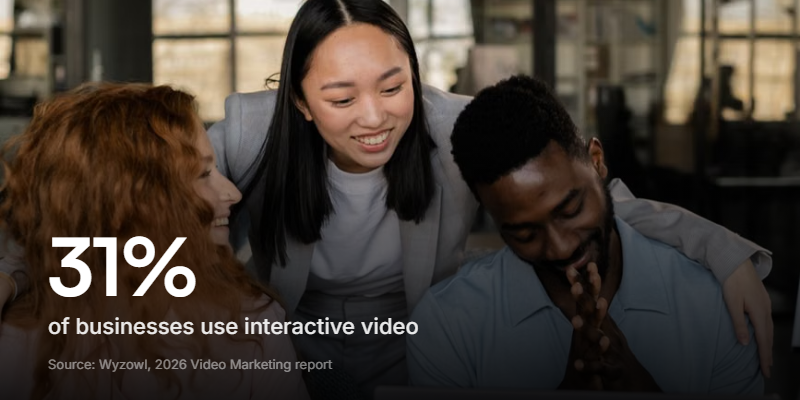
So people want it, brands mostly aren't making it, and the ones who do often struggle to get it working. Why the gap?
Mostly because "interactive video" sounds expensive. When people picture it, they picture type 2 - branching cinematic production with a dozen filmed endings and a specialist agency. That version is costly and slow, so it stays on the "someday" list.
But that's only one of the four types. The click, answer, and record-a-reply versions are far cheaper to make, and the last one barely needs production at all. The gap isn't really about demand or budget. It's a mismatch between what interactive video can be and what people assume it has to be.
What interactive video is good for
Each type shines in a different place. Match the job to the type rather than the buzzword.
- Marketing and sales. Shoppable clips, clickable CTAs, and branching product tours (types 1 and 2) keep viewers engaged and give them a next step without leaving the video.
- Training and education. In-video quizzes (type 3) turn passive watching into something you can measure. You find out who actually absorbed the material.
- Hiring. Recorded-reply video (type 4) powers async video interviews, letting candidates answer screening questions on their own time while you review at 2x speed.
- Feedback and research. Type 4 again - customers explaining a problem on camera tell you more than any 1-to-5 rating ever will.
- Testimonials. The hardest content to collect gets easier when people can record from their phone instead of scheduling a shoot.
Notice that half of these need the viewer to send something back. That's the record-a-reply type doing work the click-and-choose tools simply can't.
Do you need expensive software?
For types 1 and 2, often yes. Layering hotspots on video or filming branching storylines takes a dedicated platform and, usually, a real production budget.
For type 4, no. Collecting video replies is the most accessible corner of interactive video, and it's the one with the clearest payoff for most teams. You don't film multiple endings or build clickable overlays. You ask a question and let people answer.
This is where a video form builder does the whole job. You record a short prompt (or type one and let AI voice it), share a link, and the viewer records their reply in the browser - no app, no account. It's the same async model VideoAsk made popular, without the enterprise pricing. If you're weighing tools, our guide to personalised video platforms maps how the two-way category compares to the send-only ones.
How to make an interactive video that talks back
The record-a-reply type is the quickest to stand up, so here's the practical version. This is what a tool like Clipform is built for.
1. Decide what you want back
Three good video answers beat twenty typed ones, so be specific about what you're collecting. A candidate's take on a real scenario. A customer's story about a fix. A quick reaction to a new design. Write the questions before you touch a tool.
2. Record your prompts
Ask each question on camera yourself, keeping every prompt under 30 seconds. Seeing a face makes the whole thing feel like a conversation instead of a form, which is the single biggest lever on how many people finish. If you'd rather not film, AI voiceover can narrate a written prompt for you.
3. Let the answers branch
You don't need every viewer on the same track. With conditional branching, a "yes" and a "no" can lead to different follow-up questions, so each person only sees what's relevant to them. That's type 2's choose-a-path idea, applied to a form rather than a film.
4. Share and review
Send one link. Replies come in as video, audio, or text (people finish more often when they get the choice), and each one is auto-transcribed so you can skim and search instead of watching every clip end to end.
Recorded-reply video also holds up better in the AI era. A typed answer is trivial to auto-generate now. A genuine video reply, with a real face and voice, is far harder to fake - which makes it a stronger signal exactly when text is getting noisier.
FAQ
What is interactive video in simple terms?
It's a video that reacts to what the viewer does. They might click something on screen, choose which scene plays next, answer a question, or record their own reply. Anything the viewer does that changes what happens makes the video interactive.
What's the difference between interactive video and regular video?
A regular video plays the same way for everyone from start to finish. An interactive video responds to the individual viewer - their clicks, choices, or answers change what they see or send back. One is a broadcast, the other is a two-way exchange.
Is interactive video expensive to make?
It depends on the type. Branching, filmed storylines are the priciest because every path is a separate clip. Clickable overlays sit in the middle. Recorded-reply video (where the viewer answers on camera) is the cheapest - you just need a question and a tool that captures the response.
What are some examples of interactive video?
A Netflix choose-your-own-ending episode, a shoppable fashion clip with buy buttons, a training module that quizzes you partway through, and a screening link that asks you to record a video answer. Each is a different one of the four types.
What software do I need for interactive video?
For clickable or branching video, a dedicated platform like Mindstamp, Eko, or PlayPosit. For collecting video replies, a video form builder such as Clipform lets you record prompts and gather in-browser responses with no downloads for the viewer.
Where to start with interactive video
Interactive video isn't one thing to buy - it's four different jobs wearing the same name. Sort them by what the viewer does (click, choose, answer, or reply) and the right tool stops being a guess.
If you're making marketing content, start with clickable or branching video. If you need to hear back from real people, the record-a-reply type is cheaper, faster, and the corner of the market almost nobody's serving despite the demand. Pick one question you'd love a video answer to, and our guide to collecting video testimonials covers the practical side of getting people to actually hit record.